
Large warehouses often have wireless dead zones hidden behind steel racking. Mining operations extend hundreds of metres underground where network coverage becomes unreliable. Remote laydown yards, contractor compounds, sea cans and field service locations may have little or no connectivity at all.
Most inventory management systems assume one thing:
There will always be a reliable internet connection.
In reality, that assumption rarely holds true. Despite all limitations, inventory never stops moving. Maintenance teams still need critical spare parts. Warehouse personnel continue receiving shipments. Production requires materials on schedule. Inventory transfers continue between operational locations.
When inventory systems depend entirely on continuous connectivity, every network interruption creates operational disruption.
Employees postpone transactions until later, write inventory movements on paper, maintain temporary spreadsheets or rely on memory to update systems once they regain network access.
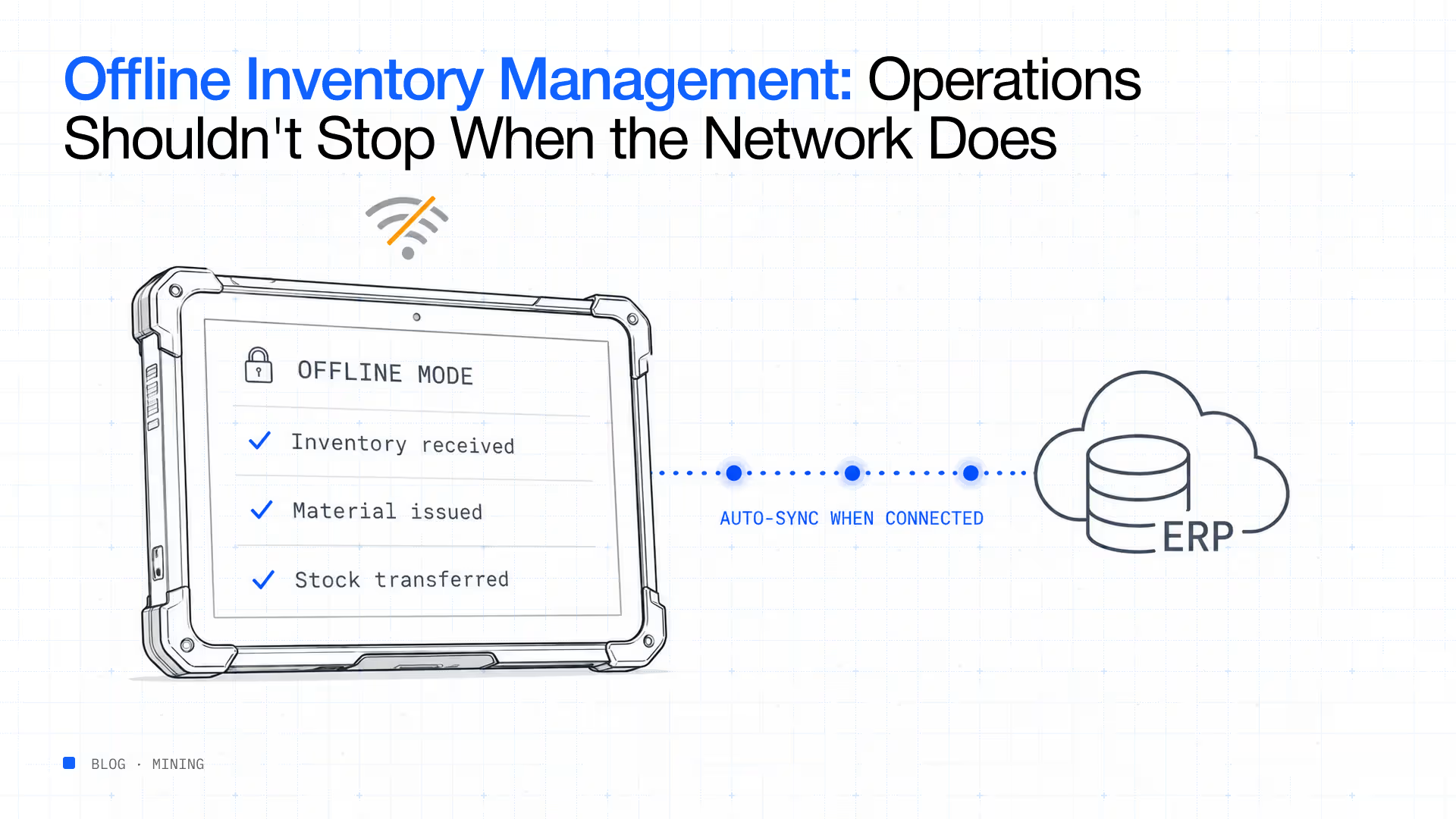
Each workaround introduces delays, increases the likelihood of errors and gradually reduces confidence in inventory records. Offline inventory management solves this challenge. Rather than preventing employees from working when connectivity is unavailable, offline-capable inventory systems allow transactions to continue uninterrupted. Inventory movements are recorded locally on mobile devices and automatically synchronised once network connectivity returns.
The result is continuous inventory control regardless of network availability. For organisations operating in remote, industrial or connectivity-challenged environments, offline capability is no longer a convenience. It is an operational necessity.
Offline inventory management allows organisations to continue performing inventory transactions even when internet or network connectivity is unavailable. Instead of requiring a constant connection to central servers, offline inventory management software temporarily stores inventory transactions directly on the mobile device.
Employees can continue receiving inventory, issuing materials, transferring inventory, performing cycle counts and updating inventory records without interruption.
Once connectivity becomes available again, the system automatically synchronises all completed transactions with the central inventory database or ERP system.
From the user’s perspective, operations continue normally.
From the organisation’s perspective, inventory accuracy is maintained without forcing employees to delay work or create manual records.
Offline inventory management therefore provides operational continuity while reducing many of the risks associated with temporary connectivity loss.
Many organisations assume offline capability is relevant only for remote field operations.
In reality, connectivity interruptions occur far more frequently than expected.
Large warehouses often contain areas where wireless signals struggle to penetrate.
Steel shelving, concrete walls, heavy machinery and extensive warehouse layouts can all create inconsistent wireless coverage.
Industrial environments present additional challenges.
Mining operations frequently extend underground where traditional wireless infrastructure becomes difficult to maintain.
Oil and gas facilities may span vast operational areas.
Construction projects constantly relocate inventory across temporary storage locations.
Utilities manage inventory across geographically dispersed depots and field service vehicles.
Even offices occasionally experience network outages due to infrastructure maintenance or unexpected technical issues.
The question is therefore not whether connectivity will ever fail.
The question is whether inventory operations can continue when it does.
When inventory software cannot function offline, operational problems appear almost immediately.
Employees continue moving inventory because operational work cannot stop.
However, inventory transactions remain incomplete until connectivity returns.
During this delay, inventory records no longer reflect actual inventory movement.
Many organisations respond by writing inventory movements on paper before entering them later into the inventory system.
Although this appears to solve the immediate operational challenge, it introduces additional administrative work while increasing the likelihood of forgotten or incorrect transactions.
The longer inventory updates are delayed, the greater the opportunity for discrepancies to develop.
Inventory may be consumed multiple times before the first transaction is recorded.
Materials may be transferred between locations without corresponding system updates.
Over time, inventory records gradually drift away from physical inventory reality.
Procurement teams continue reviewing outdated inventory balances.
Warehouse managers lose visibility into current inventory availability.
Maintenance planners cannot confidently determine whether critical spare parts remain in stock. Every delayed transaction reduces confidence in inventory information across the organisation.
Modern offline inventory management systems are designed to keep operations moving regardless of network availability.
Instead of relying exclusively on cloud connectivity, mobile applications maintain a secure local database on the device itself. When connectivity exists, inventory information synchronises automatically with enterprise systems.
When connectivity disappears, the application seamlessly switches into offline mode.
Employees continue working normally. They can:
Every completed transaction is securely stored on the device.
Once connectivity returns, the software validates, synchronises and updates enterprise inventory records without requiring employees to repeat their work.
This approach eliminates duplicate data entry while preserving operational continuity.
From the employee’s perspective, the transition between online and offline operation is often invisible.
Not every inventory platform claiming offline capability delivers the same functionality.
Organisations should evaluate several critical features before selecting a solution.
Employees should never need to manually upload completed transactions.
The software should automatically detect available connectivity and securely synchronise inventory updates without user intervention.
Inventory information required for daily work should remain available on the device even without network access.
Employees should still be able to locate inventory, verify quantities and complete operational tasks while offline.
If multiple employees update the same inventory during connectivity interruptions, the system should intelligently identify and resolve transaction conflicts during synchronisation.
Reliable conflict management protects inventory integrity while maintaining accurate inventory records.
Offline barcode scanning allows employees to continue verifying inventory accurately regardless of network availability.
Transactions remain just as accurate offline as they are online.
Continue inventory operations without connectivity: Scatterlink’s offline mobile inventory application enables warehouse teams, maintenance crews and field personnel to continue receiving, issuing, transferring and counting inventory without network access. Once connectivity is restored, transactions automatically synchronise with the ERP, maintaining inventory visibility from receipt through consumption. Learn more about Scatterlink.
Many organisations assume RFID requires constant connectivity.
In practice, RFID readers can continue capturing inventory data locally while offline, depending on the system architecture.
This allows inventory verification and tracking to continue in challenging environments such as underground mining operations, remote storage compounds and large warehouse facilities with inconsistent wireless coverage.
Combining offline capability with RFID significantly improves inventory visibility in environments where traditional inventory systems often struggle.
Offline inventory management is not simply a backup for network outages. For organisations operating across remote, industrial or connectivity-challenged environments, it can directly improve operational continuity, inventory accuracy and workforce productivity.
The most immediate benefit is simple: employees can continue working.
Receiving does not have to stop because the warehouse network is unavailable. Maintenance teams do not have to postpone inventory issues because they are working underground. Inventory counts can continue in remote storage areas without requiring employees to wait for connectivity.
This keeps inventory processes aligned with operational activity rather than allowing network limitations to dictate when work can happen.
Delayed transactions create inventory visibility gaps.
Offline mobile inventory management allows employees to record transactions when the physical activity occurs. Whether inventory is issued to a maintenance team, transferred between storage locations or counted during a physical inventory check, the transaction is captured immediately on the mobile device.
Once connectivity returns, that information synchronises with the central system.
Paper-based workarounds are one of the biggest risks associated with disconnected inventory operations.
An employee may record an inventory issue on paper and intend to update the ERP later. By the time that happens, the document may be misplaced, the quantity may be entered incorrectly or the transaction may simply be forgotten.
Offline inventory software removes this additional step.
The employee completes the transaction digitally once, reducing duplicate data entry and improving the reliability of inventory records.
Inventory accuracy depends on consistent transaction capture.
When inventory movements are recorded immediately, there is less opportunity for physical inventory and system records to diverge.
This becomes especially important in high-velocity environments where hundreds of inventory movements may occur before employees regain network connectivity.
Employees should not have to spend productive time waiting for a connection or returning to a location with network access.
Offline mobile inventory applications allow warehouse teams, technicians and field personnel to complete their work wherever inventory is located.
That means fewer interruptions, fewer administrative workarounds and less time spent reconstructing transactions later.
Offline capability is particularly valuable in environments where connectivity is unreliable by design or difficult to maintain.
Underground mining operations present some of the most demanding conditions for inventory management.
Inventory may be stored across underground levels, workshops, production areas and remote locations where network connectivity varies significantly.
Maintenance teams still need to issue and return critical spare parts regardless of connectivity.
An offline inventory application allows these transactions to continue underground and synchronise when connectivity becomes available.
This helps maintain inventory visibility across both surface and underground operations.
Remote mine sites can experience intermittent connectivity because of their geographic location and infrastructure limitations.
Inventory operations cannot simply stop whenever the network becomes unavailable.
Offline inventory management allows warehouse personnel and maintenance teams to continue working while preserving the transaction history required for accurate inventory control.
Sea cans and temporary storage facilities are often positioned away from established network infrastructure.
Inventory stored in these locations can become difficult to track when employees rely on manual records.
Offline mobile inventory applications allow personnel to identify, count and move inventory without requiring a continuous connection.
Connectivity problems are not limited to remote locations.
Large warehouses containing extensive steel racking, machinery and multiple storage zones can experience wireless dead spots.
Offline capability ensures a local connectivity issue does not bring inventory operations to a standstill.
Maintenance teams frequently work away from central warehouses.
They may carry spare parts in service vehicles, access remote storage locations or consume inventory directly at equipment and production sites.
Offline mobile inventory management allows technicians to record inventory consumption at the point where the work occurs rather than reconstructing transactions later.
Not every system that claims to support offline operation provides the same level of functionality.
Before selecting an offline inventory management solution, organisations should evaluate how the application behaves when connectivity disappears.
Offline functionality should extend beyond simply recording transactions.
Employees may need to search inventory, verify quantities, identify locations and review relevant information while disconnected.
A useful offline application should provide the information required to complete the workflow without forcing users to reconnect first.
Ask how transactions are synchronised when connectivity returns.
The system should automatically upload transactions without requiring employees to repeat work or manually reconcile multiple records.
Consider a scenario where multiple employees work offline and interact with the same inventory.
The system needs clear rules for managing conflicting transactions and preserving inventory integrity when devices reconnect.
Offline capability should not create another inventory database.
The solution should integrate with the organisation’s ERP or central inventory system so that offline transactions eventually become part of the same trusted enterprise record.
Offline inventory management becomes considerably more powerful when combined with automated identification technologies.
Barcode scanning allows employees to verify inventory quickly, while RFID can support faster identification of multiple tagged items.
Technology provides the foundation, but operational discipline determines whether offline inventory management delivers its full value.
Identify the processes that must continue when connectivity is unavailable.
Receiving, issuing, transfers, cycle counts and inventory consumption are common examples.
Defining these workflows ensures employees know exactly how to operate during disconnected periods.
Devices should synchronise regularly whenever connectivity is available.
This ensures employees begin offline periods with current inventory information and reduces the amount of data that needs to be reconciled later.
Consistent item codes, barcode labels and RFID tags reduce ambiguity during offline transactions.
Clean inventory master data is particularly important because employees may have limited access to central systems while working offline.
Organisations should monitor whether offline transactions are successfully synchronising.
Unresolved transactions should trigger alerts so inventory teams can investigate issues before they affect inventory accuracy.
Keep inventory moving wherever work happens: Scatterlink is built for inventory operations that cannot depend on continuous connectivity. Its offline mobile applications allow teams to capture inventory transactions in warehouses, underground operations, remote sites and field environments, then synchronise those transactions with the ERP when connectivity returns. Explore Scatterlink’s RFID inventory management solution.
Offline capability solves an important operational problem, but it is only one component of effective inventory management.
An organisation can capture every transaction correctly and still struggle to understand inventory performance if information remains fragmented across systems.
The next step is connecting those transactions.
When mobile inventory applications, RFID, barcode scanning and ERP systems operate as part of one connected inventory environment, organisations gain more than offline transaction capability.
They gain inventory visibility.
They can understand where inventory is located, how it moves between locations and when inventory is consumed.
This is where inventory intelligence becomes important.
Rather than simply recording what happened, an inventory intelligence platform can help organisations understand what the inventory data means and where action may be required.
Connect offline transactions with inventory intelligence: Scatterlink combines offline mobile inventory management, RFID, barcode technology and ERP integration within an inventory intelligence platform. The result is continuous inventory visibility from receipt through consumption, even when work takes place beyond reliable network coverage. Learn more about Scatterlink’s inventory intelligence approach.
Inventory does not stop moving when the network goes down.
For warehouses, mines, workshops, yards and field operations, critical inventory transactions continue regardless of connectivity.
Organisations that depend entirely on online inventory systems are therefore exposed to a simple but costly operational risk: every connectivity interruption can create a gap between physical inventory and digital inventory records.
Offline inventory management removes that dependency.
By allowing employees to continue working, capture transactions digitally and synchronise information when connectivity returns, offline inventory software helps maintain operational continuity without reverting to paper-based processes.
The strongest solutions go further by combining offline mobile capability with barcode scanning, RFID, ERP integration and real-time inventory visibility.
That combination allows organisations to maintain control over inventory wherever work happens, whether inside a warehouse, across surface and underground operations, or at a remote field location.
Offline inventory management allows employees to perform inventory transactions without an active internet or network connection. Transactions are stored locally on the mobile device and synchronised with the central inventory or ERP system once connectivity is restored.
It allows inventory operations to continue during network outages or in locations with limited connectivity. This reduces transaction delays, paper-based workarounds and discrepancies between physical inventory and system records.
Yes, provided the software has a true offline mode. Employees should be able to access necessary inventory information and complete transactions while disconnected, with automatic synchronisation once connectivity returns.
Yes. Offline mobile inventory applications can capture barcode scans locally and associate them with inventory transactions. Those transactions can then synchronise with the central inventory system when connectivity is restored.
RFID readers can capture tag information locally in an offline workflow, depending on the hardware and software architecture. The captured information can then be synchronised with the central inventory system when a connection becomes available.
Yes. It is particularly valuable in underground mines, remote mine sites, workshops, sea cans and other locations where connectivity may be intermittent or unavailable. Offline capability allows inventory transactions to continue while maintaining a digital transaction history.
Scatterlink’s mobile inventory applications allow teams to receive, issue, transfer and count inventory without continuous network connectivity. Transactions are synchronised with the ERP when connectivity returns, while RFID, barcode scanning and inventory intelligence provide broader visibility into inventory movement from receipt through consumption.
%20(1).avif)
.avif)
%20(1).avif)